Back to all tools
Core Tools
QR Code
Gen & read
Text / URL / Phone / Email
QR Color
#000000
Background
#FFFFFF
Size
300pxAbout the QR Code tool
QR Code is one of the core tools on EraserImg, built to gen & read in just a few clicks, with no design experience needed.
Examples

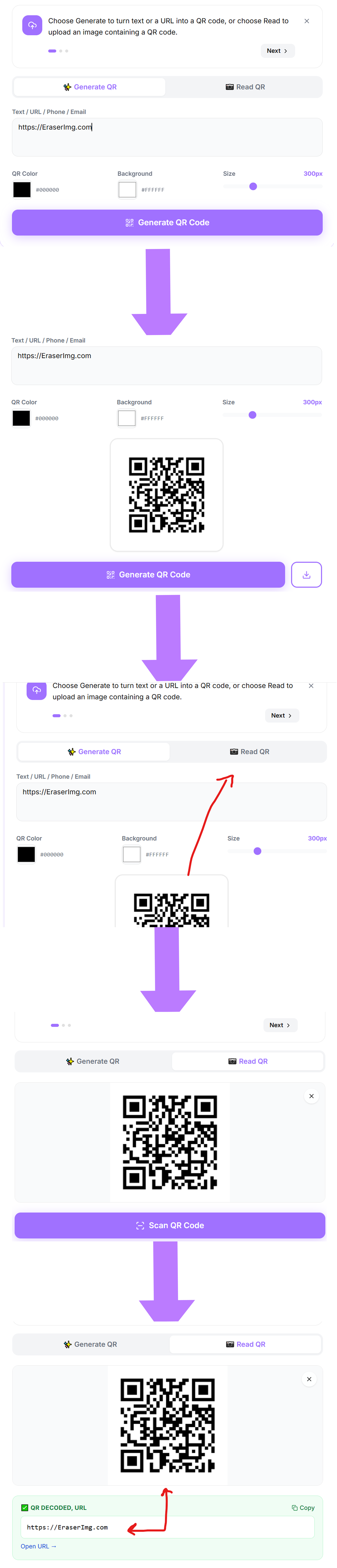
How to use the QR Code tool
- 1Choose Generate to turn text or a URL into a QR code, or choose Read to upload an image containing a QR code.
- 2For Generate, type the link or text and the QR code updates instantly in the preview.
- 3For Read, upload a JPG, PNG, or WebP photo of the QR code and the tool decodes it automatically.
- 4Download the generated QR code as a PNG, or copy the decoded text from a scanned code.
Common ways to use QR Code
- Prepare product photos for an online store or marketplace listing
- Clean up an image before adding it to a document or presentation
- Get a polished result in seconds without opening design software
Frequently asked questions
Is QR Code free to use?
QR Code has no cost, no usage limit, and no watermark on the downloaded file.
Do I need an account to use QR Code?
No account or sign-up is required. Upload your image and download the result directly.