Back to all tools
Core Tools
BG Replace
Swap BG
⚡ Fully live: the subject is cut out once, and after that, switching colors/backgrounds and dragging to reposition updates instantly, no waiting.
Subject Image (foreground)
Drop subject image
The object/person you want to keep
Background Color
Custom Color
About the BG Replace tool
BG Replace is one of the core tools on EraserImg, built to swap bg in just a few clicks, with no design experience needed.
Examples

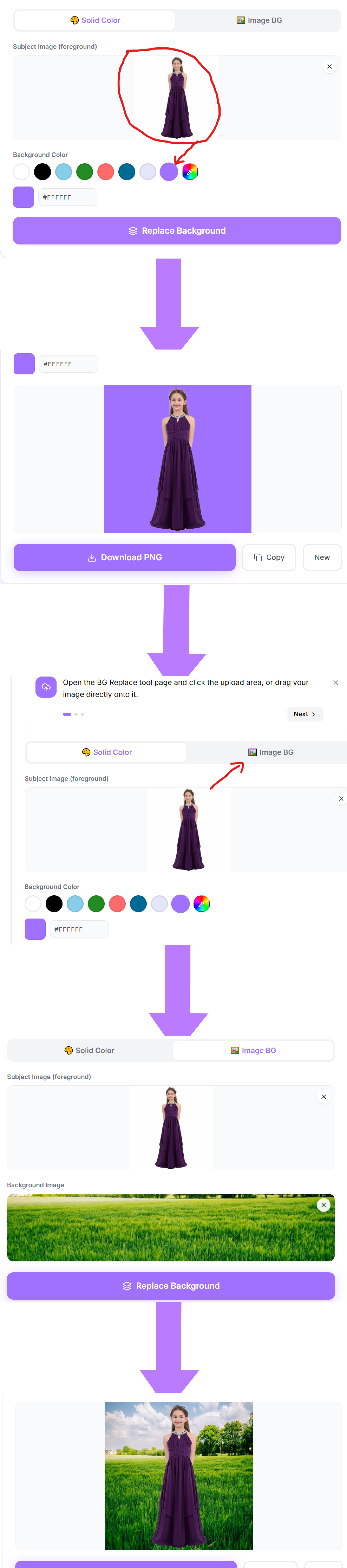
How to use the BG Replace tool
- 1Open the BG Replace tool page and click the upload area, or drag your image directly onto it.
- 2Choose a JPG, PNG, or WebP file up to 20MB. Your image loads instantly into the preview panel.
- 3The tool processes your image automatically. A progress indicator shows while the result is prepared.
- 4Review the result in the before and after preview, then click Download to save the finished file to your device.
Common ways to use BG Replace
- Prepare product photos for an online store or marketplace listing
- Clean up an image before adding it to a document or presentation
- Get a polished result in seconds without opening design software
Frequently asked questions
Is BG Replace free to use?
BG Replace has no cost, no usage limit, and no watermark on the downloaded file.
Do I need an account to use BG Replace?
No account or sign-up is required. Upload your image and download the result directly.